deviant art


Login
Join deviantART for FREE Take the Tour Lost Password?
Deviant Login
Shop
 Join deviantART for FREE Take the Tour
[x]

Featured in Groups:

Details

August 22, 2009
967 KB
Link
Thumb

Statistics

Comments: 26
Favourites: 14 [who?]
Views: 11,461 (0 today)
Downloads: 3,043 (0 today)
[x]
:iconraynhard:
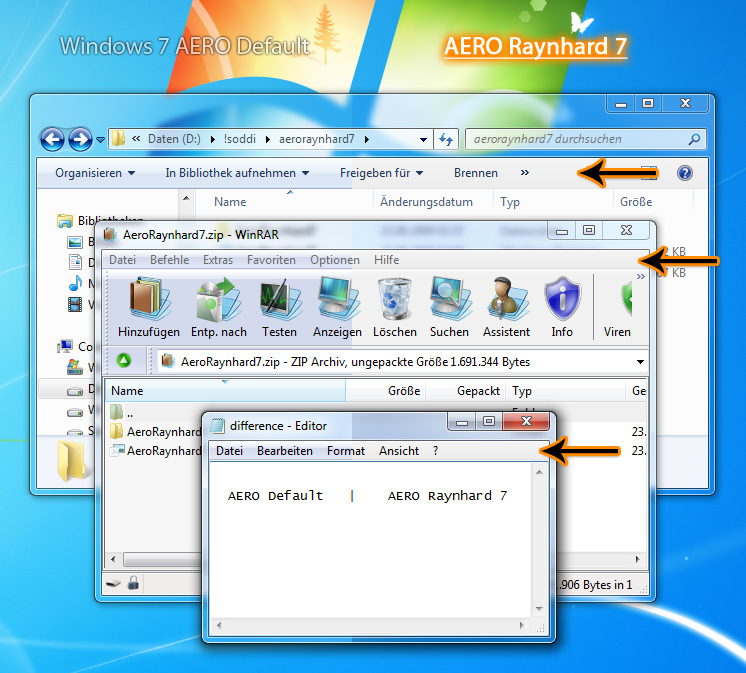
Visual Style for "Windows 7", tested under the Final build 7600

This visual theme is almost the default Windows 7 theme, but without these ugly blueish gradients (see the preview picture).

To install this theme:
- patch your windows to allow third party styles e.g. with the "Universal Theme Patcher (v1.5, Build 20090409)", google it ;)
- copy the "AeroRaynhard7.theme" and the "AeroRaynhard7" directory from the ZIP file into the directory "C:\Windows\Resources\Themes"
- double click the \"C:\Windows\Resources\Themes\AeroRaynhard7.theme\"
- done
:icon:
Add a Comment:
 
love 1 1 joy 1 1 wow 0 0 mad 0 0 sad 0 0 fear 1 1 neutral 0 0
:iconraynhard:
Had the "looks like Win95" problem today, too (english Windows7 SP1) after install of the latest updates. Restore, repatch the file three files with the "Universal Theme Patcher", restart windows and reapply the theme => fixed it for me.
Reply
:iconoldirtdog:
also forgot to add when the theme wasn't working properly desktop composition and use visual styles on buttons would stay unchecked whether or not you actually checked it off in adjust visual effects. and when i say not working, it's the bug described above as theme appears as a classic theme (grey taskbar and no see contents while dragging)
Reply
:iconoldirtdog:
on win7 64 bit mine stopped working too after some updates, but after i tried onlyblack and soft7 yours magically started working again. don't know if trying those other themes fixed something or not. kinda hard to troubleshoot a problem when you can't re-create it.
Reply
:iconsonic4000:
~SoNiC4000 Oct 25, 2010  Hobbyist Interface Designer
It appears that it isn't working... When applied, all windows change to Classic non visual style appearance :/ And here i thought i would use it...

--
~Emiya Shirou
Reply
:iconraynhard:
And you used the "Universal Theme Patcher" => then reboot => then copy theme => then doubleclick "AeroRaynhard7.theme"?
Reply
:iconsonic4000:
~SoNiC4000 Oct 27, 2010  Hobbyist Interface Designer
"And you used the "Universal Theme Patcher""
I Installed this after fresh install of my windows, i got this installed all the time. (meaning those files are patched)

"then copy theme => then doubleclick "AeroRaynhard7.theme"?"
Yes exactly, and the only thing that loads is classic non vs windows design, with those grey bars etc.

--
~Emiya Shirou
Reply
:icondedpidgin:
Used to love this theme, but recent Windows 7 updates have killed it (on 64bit at least) ... no idea WHICH updates I'm afraid. Would love to have it back - I HATE that baby blue but don't want a vastly different theme as most seem to be.
Reply
:iconraynhard:
Still works for me. Have the 64bit Windows 7, too with all updates available.
Reply
:icondedpidgin:
I had to rerun the theme patcher... an update must have changed something. Perhaps an optional one.

Anyway, that fixed it THEN, but now it seems properly broken with later updates - I could possibly narrow it down if you liked. Restoring and repatching with UTP doesn't work on this theme but DOES work on the other 5 or 6 custom ones I've downloaded in the past. Weird that it seems to be picking on yours! ;-) I prefer your theme to the others that do work (Clearscreen Sharp, OnlyBlack, Soft7, Win7-Blend) - all ones that aim to get rid of the baby blue, but change other stuff I don't want changed.
Reply
:icondedpidgin:
Update KB979538 is the one that totally broke it for me - uninstalling didn't work, had to do a system restore. Hope that helps.
Reply
:icon:
Add a Comment: